KDE Connect is the best! Also why isn't the app called KDE Konnekt 🤣
2y 10mon ago by lemmy.world/u/BearPear in linuxmemes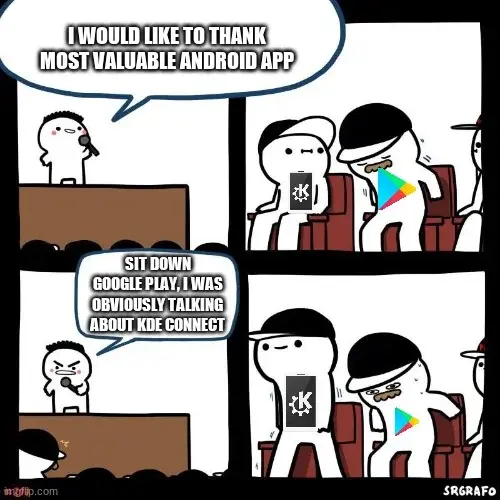
meme stolen
Better to avoid 3 k's where possible.
The KDE Konnect Kult: Where acronyms shouldn't be used.
☠️ bruh
The first time it paused my YouTube video inside Firefox when a call came in on my phone, it blew my mind. And then when the call ended, it just casually resumed the video. I love it. That, the clipboard syncing and easy sharing of files between devices make it absolutely awesome to have.
Especially the file sharing for me. I was previously using USB cable, but during large transfers it tends to just randomly disconnect (thanks MTP). Over WiFi I get faster transfer speeds and it doesn't keep disconnecting.
Although yes, theoretically I could move .tar archive or individual files over WiFi using netcat and Termux, but that's not the most elegant solution. Also for some reason netcat is somewhat broken on Manjaro. Ok, the issue isn't with nc. Ok (2) it is netcat. I just added a 2nd layer of issues that made me think it's not.
Edit 3: Ok. MAYBE netcat. I can see incoming connection in Wireshark and it sends back TCP RST. Edit 4: Tried with UDP, I can see the received text in Wireshark, netcat drank methanol.
I've always used python3 -m http.server to get files from PC->phone.
For phone -> PC I use a library called droopy.py
I use simplex on my phone and simplex CLI on my computer. I just message back and forth. It's already giving me any notifications from my servers, so it's already there anyway.
Hey thanks for this suggestion, you motivated me to look into simplex a bit more than just lazily downloading it on my phone
Nice. It's pretty great. I particularly like the multiple identities. I have one on my phone that only connects to all of my devices, and I can send notifications/code snippets/whatever I need between them. With the CLI app, you can even set it up to pipe messages directly to your notifications daemon, or automatically accept files.
That's a great usage, I'll definitely try that! Plus it's seems actually usable by average Joes for quickly starting a private chat. Hopefully they'll start packaging the CLI version for linux distros (idk why but I prefer downloading a package to using an install script), also I saw that simplex will release a desktop version of the app
I think you can already get the desktop GUI version. If I remember correctly, the installer script just downloads the appropriate binary to an appropriate path. The only irritation is that they don't have arm binaries, and it's rather difficult to compile. I've not managed to do it. Hopefully they'll just release arm binaries soon.
Oh you're right, I looked again and found the releases page on github, they have windows, macos (also aarch64), ubuntu, and Appimage for everybody else (x86 tho yeah)
I'm not really familiar with KDE connect (and new to Linux in general, but can't see myself ever going back to Windows), could you elaborate on the first part? How does KDE Connect help you watch firefox videos on your phone? Thanks!
Somehow, KDE Connect treats a media stream happening on a connected device the same as if it's playing on your local device. If you're playing a video on your laptop in Firefox it will add one of those "music player" things in your phone's notification shade, allowing you to control the video from your phone.
Android automagically pauses everything it deems to be "media playback" until the end of your call, thus also pausing that Firefox video on your laptop.
Oh nice, that sounds cool. Not an implementation of that type of software that I would ever have thought of.
Pretty much like "continuity" between iPhones and Mac, neat.
Wow it can do that. I did not know. That is such a handy feature.
Yeah, kde connect can control media players on your desktop and automatically pause them when a call comes in. To make it work with Firefox I do now realise it might be limited to kde desktops only though. But if you have that, all you need is to install the plasma integration extension for Firefox (which does a couple of cool things) and then kde connect can see Firefox's media as well.
F-Droid is the more valuable app store anyway. I always check there before Google Play.
Forged google play, use the aurora store instead
You guys are checking Google Play?
Check Neo Store. It is an alternative front end to F-droid and has been way less buggy for me. Though to be fair just yesterday it ate up 20% of my battery life due to not being able to sync a repo (I think), but that hasn't happened before.
I use Droid-ify myself. It looks like Neo Store is a fork of it. Although neither has been updated for a number of months, Droid-ify's latest version is most recent.
I've tried droidify before it doesn't seem to allow parallel download similar to that in aurora store
aurora droid is imo pretty good
Happy to stumble across this meme. I didn't know KDE Connect was a thing
Well as one of today's lucky 10,000, let me tell you it's not dependent on the KDE/Android combo. There are versions for Windows, macOS, and iOS (although some functionality is missing).
Upvote for relevant xkcd
Also, gconnect is a Gnome frontend for the same software.
Same! I've already installed to my phone and will play with it tomorrow.
You will like it. Try it out.
Fdroid: am I a joke to you?
F'real
*F-real
And plenty of banking apps consider it as a security threat. 😅
"It's so good that other apps are threatened merely by its presence"
Android auto copies numbers in SMS text messages to the clipboard, so any apps capable of monitoring the clipboard are suspect for one time security pin harversting.
Happens quite a lot in my country (Malaysia). People, especially the older ones, install apps form unknown source because their WhatsApp/WeChat friends shared them, then their online banking access got compromised, savings account emptied out, and there's nothing the banks can do because on their record, its the account holder doing the transfer.
Some banks now moved away from SMS and use dedicated app for this purpose now.
Cave Johnson, we're done here!
Hmm. I did not know that. Why?
It's one of the reasons my next phone will be Android (with a non-spying custom ROM) instead of an iPhone. Although KDE Connect is already surprisingly powerful on the latter given the limitations of the platform.
The sheer amount of utility Connect has on iOS is insane. It’s starting to compete with handoff and iCloud sharing with how many features they’re recreating.
You decide on graphene or calyx?
I prefer graphene personally but not gonna shill. I've dailied both but they are both great. Calyx has a bigger emphasis on free software while graphene has a bigger emphasis on privacy, but you can still achieve most FOSS calyx software on graphene as well.
I prefer grapheneos and have ran it for some years now, but I would prefer to stay out of that debate as the calyx community and graphene community do not like eachother.
Like, even mentioning them in the same sentence will get both of their police on you and start a flame war.
at least CalyxOS does support older Pixel phones aswell as the Fairphone 4
of course from a security standpoint older Pixel phones are less secure but still way more than outdated stock android while also saving on ressources (money and ecological wise)
it's not complete black and white, there are nuances between which favors one over the other
Check out DivestOS
KDE Connect is awesome. I've been using it since it first came out (I think it was a GSoC project) with a variety of phones, and am 100% happy with it.
BTW, about the naming, KDE stopped the K thing around KDE 4, with apps such as Cantor.
About damn time.
Trying to find your way around an unfamiliar system where everything started with K was enough to put me off desktop Linux.
Funnily enough it feely pretty natural for someone speaking german (and some other languages). E.g. Konsole is the german word for console etc. Other words like Konqueror do look like a strange mix.
Unless the old programs are replaced entirely (or completely rewritten), I think the old naming system will be here to stay for a looong time, considering how established it is.
Oh hehe, I had seen KDE connect here and there but never really tried it myself, how are you using it?? What good things does it bring to your lives? :)
It makes sharing files between your PC and phone super easy. And if you set it up right, you can even browse your entire phone's filesystem from your PC as well. Great if you take a lot of photos or download a lot of memes on your phone and want to quickly offload them to your computer. It also lets you play and pause media from your phone, so if you're playing music or watching a movie on your PC and need to pause while AFK, then it comes in pretty handy. Not only that, but it also has a presentation remote and can turn your phone's touchscreen into a trackpad and keyboard; great for HTPCs.
Those are just the features I use, it has way more than that. imho I think it might have too many features lmao
EDIT: Also, how could I forget about the feature that I mainly use KDEC for, the battery indicator plugin. It lets you monitor your phone's battery from your computer.
Sounds like phone link by Microsoft. Pretty neat, there should be a disclosure here or edit. You can't browse all of Android file system unless you root the device Google has locked down some file paths due to exploitation by the end user and attackers.
Eh thats kind of obvious one. You can't access such files from your phone either without root. He reffered /sdcard
I think one difference may be that it actually works. I could never get the Windows Phone Link to work with my S9 when I was trying it.
Not sure if that would have to do with the age of your device or not though. Just a thought worth putting out there. Which would mean KDE does better with older devices and that is nice.
Also as a user who has never had problems with phone link. My answer would be that we are both a logical fallacy for our experiences to represent the experiences of others.
I like Phone Link and I will give KDE a try for sure, especially if it works well. However, I find myself not using it as often as I thought I would.
I use it to share files between devices. I can also share urls between devices. Clipboard history is automatically synced between devices.
I can also use it find my phone if I misplace it somewhere.
It is also possible to run custom commands. You can shut down or restart your pc from your phone. My favourite is the screenshot command, after the screenshot is captured, it is automatically transferred to my phone. A really handy feature.
There is more. You can also play pause and control the volume of a video playing on your phone or on your laptop from the connect app. Your device can even be used as a touchpad.
Could it be used to transfer files from linux to an Android TV box?
Sorry, I don't know. I don't have an android TV box. Is kde connect available on the android tv playstore?
Looks like it is. Time to learn something new!
Thanks.
KDE Connect is so good that there is a user-maintained version that works in GNOME as well.
Gsconnect!
Ah, googling now!
It's a Gnome shell extension if that helps.
I have a cheap "remote" for my PC, so I rarely use it for media or couch watching, BUT
Take ~50 photos
Get home
Two or three taps
Now they're all on my PC.
I use syncthing for that, don't even need any taps after it's set up. Did I mention I love syncthing? Because I love syncthing.
Could you clap your hands to confirm you really love it?
Syncthing knows I love it, it needs no proof.
He is happy. And I think he knows it. He must now clap.
How's the battery drain on it? I used to use it, but the battery drain was atrociuous af. I moved onto syncthing fork which made it considerably better but it was still so high that I just ditched the thing entirely. Mind checking now much % it drains in the background?
I use immich on my server :) KDE connect is amazing tho
I live KDE connect, especially the filesystem share (it uses sshfs in the background).
And yes, it should have been called KDE Konnect 🤣
Kape, the K pocket environment
Google Play
Is that like Aurora Store for google cucks?
I had no idea what that was, but I just installed it off F-Droid and it looks sick
This is why I like Lemmy. You scroll through it and suddenly learn about neat free software you've never heard of, unlike Reddit where you would scroll through it and learn a new slur for an ethnic group you've never heard of.
Love that app
It's so good! Installed it once to try it and it never left my laptop. When they added the gyro mouse sensor it got even better - controlling my kodi mediacenter with it is just amazing like that. Also unlocking the screensaver without typing my password, fast even using over VPN etc...its just perfect.
I have used KDE Connect a couple of times (when I used Kubuntu), and always uninstall it because it provides nothing of value to me. I rather just reach for my phone that's already on my desk.
That's your first mistake, never do something the easy way when you could do it in a way that makes you feel like a cyber ninja
Pause/play/skip for music from the other room is nice, auto mute, phone notifications on desktop, etc... Even with my phone next to me, some features are still useful.
KDE connect worked nicely on my iphone for awhile but now I can't get it to work. But yeah it is pretty cool.
Lol.
So often I see this.
“This thing on Linux was so rad until it stopped being rad, rather suddenly. I loved it while it worked though.”
Believe it or not, my daily driver is SteamOS these days and I haven’t had any problems.
I first started using Linux with Redhat 5.2 in like 99/00. So I’ve pretty much got it down these days. I’m not saying I’m an expert, I’m definitely not, but I don’t get beat any more.
Wow, that's awesome. You're so cool bro.
I wonder when there will be a Windows client for KDE Connect. I really miss it at work.
I am sorry, but it's been in Microsoft store for a while now. There's also offline installer on the download page.
Edit: Based on archive.org, at least since April 2020.
I suggest the offline installer over the Microsoft Store version.
The option to share files via right click > "Send to" seen below doesn't appear for me using the Microsoft Store version.
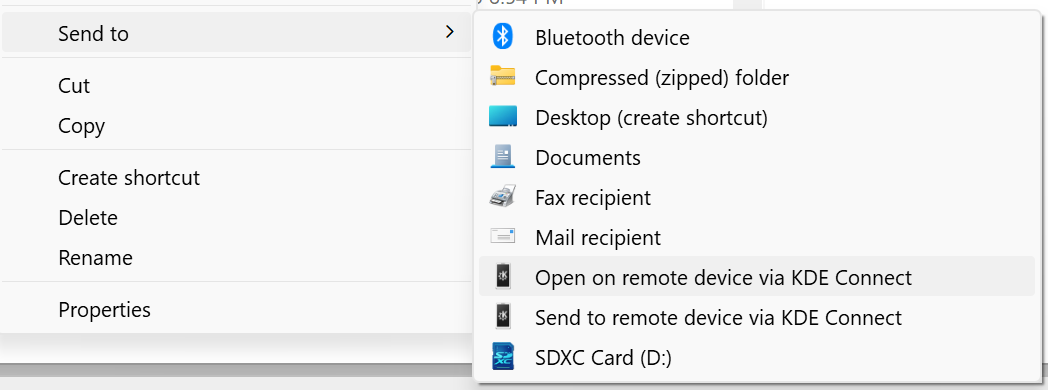
I uh I have good news
I wonder when there will be a Windows client for KDE Connect.
There is already one. I remember using it. But I think the linux one works better than the windows because of better integration.
Tbh it's kind of a terrible app. I can never keep it connected and the UX is just painful. The most useful feature is transferring files, but when uploading to my PC the dialog box always closes itself before I can see where the file went.
I can never keep it connected
Disable battery optimization for KDE Connect on Android. (If you're on Samsung you might be screwed. They did weird stuff with optimizations.)
Edit: Related: https://dontkillmyapp.com/
Samsung user here. I'm working with a Galaxy S22 Ultra, Galaxy Tab S7+ and a Dell XPS 9310 running Fedora. Set KDE Connect to never sleeping on the Samsung devices and it will work flawlessly. Transferring files, copy paste between devices, notifications etc just work for me. The only platform where I felt KDE Connect didn't work smoothly was my Windows gaming machine. I gave in and just used the Microsoft phone connect app for that machine but everything else it's KDE all the way.
Holy god. Thank you.
No like when I go to reconnect it when I want to transfer a file I need to go through the pairing process again because it somehow loses the pairing even though both devices still show each other as trusted.
It stays open on my phone with battery optimizations disabled, but the Windows app needs to be manually started from the tray icon after waking from sleep/hibernate for it to work. I've even tried setting up a scheduled task to run the app when my PC wakes but it just doesn't work unless I open it from the tray or restart the whole app.
You could create a Task to restart Apps that don't work after Sleep, Windows has an specific event for waking up from sleep (don't know the exact one right now though).
I already had to do that to fix my Bluetooth driver in this exact scenario...
I'll do that post my results here.
it goes to your download folder
Yeah thanks tips. I figured that out a while ago after going through way more trouble that I should have had to. Next time I need to use it there's a good chance I'll forget again and start the whole process all over because some dev thought an auto closing dialog that stays up for a fraction of a second was a good idea.
closes itself before I can see where the file went
Downloads folder
Thanks, you're the second person to reply with the same useless advice.
Hey I'm not the person who can't find their files.
I know where my files are, I can use google. I'm the person complaining about the bad UX. I think there's a reason every other program has a "hey show me where you just put this file" button.
I think KDEconnect assumes you want to store files in the folder you tell it to store files in, which happens to default to "Download" unless you change it in the settings.
You can try transferring files through MEGA. Its parallel synchronization is really fast.
I’m Kim Dotcom and I approve of this message.
For real though, I use mega for everything. I fucking love it.
I didn't know that transferring/synchronizing files can be that fast. It's almost as if I run the server locally. And the clients are open source too.
Or try to come at the problem from the other angle and use something like tailscale to get around any potential networking issues.
Then use any peer-to-peer transfer app or tailscale's own file transfer tool and tailscale will ensure the fastest route between the devices no matter where they are physically located.
Sounds great, maybe I'll check it out later. I need to dive in deeper, to understand everything, unlike MEGA.
everytime i missplace my phone this saves me so much time
Same here.
I never could get it to work in KDE Neon.
You're missing out. The trackpad function is amazing, not having to get up from bed when your desk is too far is a god send. I know I could buy a wireless mouse, but why if you can just use your phone?
This, it works great. Also it's the future we deserve. Screw rational feature design for the common denominator, I want my phone to control my computer in every way possible and vice versa.
you need to be on the same network which also means excluding VPN on local network (or connect both PC and phone on the same VPN network)
Neat app! Definitely will try it when I get home.
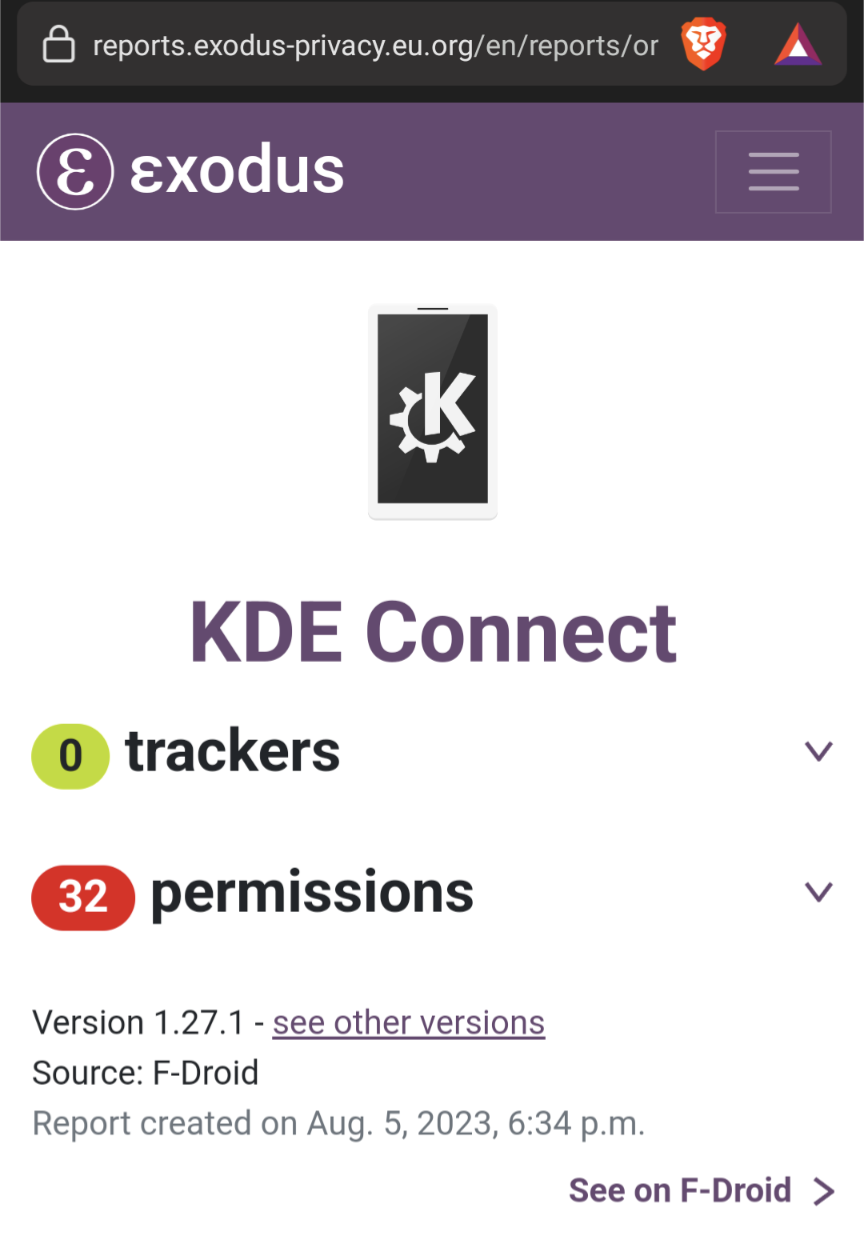
Yes, I'm just pointing out there is no tracking. Permissions are fine depending on context of what the app actually does
Does it work with awesome wm?
What is awesome wm?
Awesome is a tiling windows mánager.
Yes it should
Awesomewm user here ; it works very well. One thing to handle is that the daemon does not start automatically. maybe I frogged up when installing.
In any case, the daemon (I think, check the arch wiki page for kdeconnect) is located at /usr/bin/kdeconnectd, so maybe you should start it yourself in your awesome config.
🤯
KDE connect is so good it works better than the windows built-in integration to android.
While I love the idea of KDE Connect, in practice the SMS feature doesn't work reliably at all.
Don't forget you can't send pictures from your PC because... reasons.
Ha, I tried to use it the other day the button just does nothing. Everyone keeps telling me to change the battery settings on my phone (which I did) but I think the app is just fundamentally broken. It tries to do too many things and is bad at all of them.
Idk... I struggle through it for the ease of typing. I think the issue is more on my phone's side than KDE connect itslef
I feel like they missed a perfect opportunity, though it may just be the most 2000s thing ever.
Because it wasn't made by King K. Rool
I cannot say I know if this is a function on the Linux version, but one tiny gripe I have with Connect is that I can send my clipboard from my phone to my windows desktop but not vise versa.
I can definitely say, though, that the pretty much only other function I use (file sending) is pretty good when I want/need to send smaller things to my desktop and vice versa.
I've definitely had it work in the past!
If you're talking about the clipboard feature working on the desktop version, I'll have to do dive into connect.
I've had to use CX File Explorer here and there for various things. KDE is just a better version of that then?
CX was pretty lightweight last I used it.
KDE Connect is an android app that allows you to control some parts of your PC from your phone if you have a corresponding app installed on your computer, not a file manager.
And vice versa - you can run commands on your computer from your phone. Handy when you're in bed but remember that you forgot to turn the computer off.
Well, that is what I said if you read it again ("control some parts of your PC from your phone"). I did forget about controlling your phone from your computer though, which can also be done.
i was struggling to install the thing on linux. although i am still noob on ubuntu :/
What problem are you having?
i am not on my laptop right now, but i am running ubuntu on a vm: and didn't know how to run kde after installing from ubuntu software store, and apparently it require usb debugging on android, although i would prefer wireless debugging: i even struggled to install the teamviewer .deb file, but figured it out afterall and had to figure how to run teamviewer, then after launch, i had to activate remote desktop, i had to install this rdp thing, and yet couldn't reach the teamviewer server. again, all this on the VM ( Vmware on windows 7) i am used to windows gui, so i took alot of things for granted, and the smallest task requires me to look up a guide for it, but kinda worth it, since i can't install win 11 since my laptop is too old and couldnt install win 10 since it required a different partition system, and after that it didn't install, so i am familiarizing myself with linux on vm for now
OK, I just tried reinstalling KDE connect on my phone. I didn't have to do anything with USB Debugging. There should just be KDE Connect in app menu after you install it, there you should be able to pair a new device. However I don't know how well that may work under VM.
About the TeamViewer, I did use TeamViewer on Linux Mint without problems. Maybe again something to do with VM. RDP just seems to be Microsoft's remote desktop protocol unrelated to TeamViewer.
But I never properly tried Ubuntu. I didn't even manage to install it as the installer kept crashing :-/
i guess i ll have to dig in this further. i ll keep ur experience in mind.
Documenting results (mostly successful)
Trying to download KDE Connect in Ubuntu Software
The only unsuccessful part.
I was waiting for it to download but it wasn't moving. So I hit "Cancel" in hope to retry the download. However it shown as installed even though it wasn't. Trying to remove KDE connect resulted in following error:
 Direct image link
I tried to find a way to delete cache or config for Ubuntu Software (snap-store), but I only managed to delete all icons from it by deleting ~/snap...
Installing via apt
As expected, the good old sudo apt install kdeconnect did its job perfectly.
 Direct image link
Pairing KDE connect
As expected, this did not work right away as by default the network adapter is attached to NAT in VirtualBox. As such I couldn't see any devices in KDE connect.
The solution was to change it to Bridged Adapter and select the desired network card. This way it would directly communicate with outside world using my laptop's network adapter.
The setting is located in: (Your VM) > Settings > Network
A new problem arose. Trying to pair my phone with VM instead sent pairing request to host as I have KDE Connect installed on it and both Host and Guest are using same IP address.
That problem solved itself after pairing my phone with host computer.
KDE Connect dynamically assigns ports in range 1714-1764. I guess at first they were trying to both use the same port, thus host received the pairing request instead, but after pairing and connecting with host, guest had to use different port and now they were able to successfully connect.
Edit: Nope, they do get separate IPs. I don't know why this occurred then.
So I was able to connect both my phone and laptop:
 Direct image link
TeamViewer
After downloading the TeamViewer .deb file I just double clicked it and then clicked on install in the installer window
 Direct image link
Then I just normally launched TeamViewer from app menu and requested connection from my phone.
Ubuntu just asked to select display and allow remote interaction
 Direct image link
And this is a screenshot from my phone:
 Direct image link
man this is a dedicated effort! thank you so much.
I'll try to download Ubuntu 23.04 ISO overnight and try it tomorrow on VirtualBox (7.0).
It does not require USB debugging or have anything to do with TeamViewer.
then one less step to figure out
Fwiw most/all of the plugins didnt work for me in Ubuntu until I switched from Wayland to X11
try flatpak version or appimage version, I've seen better results for apps on those formats in terms of ease of use
sure will
I like how you have mentioned your instance name in username to distinguish between your alt accounts
That's not the purpose. I just wanted it to be clearly visible for people to tell my home instance without having to check my account. (This is my alt account.)
I had to do it this way due to stupid username decision. I didn't yet know what Lemmy was, so I used the same username I used on SDF.org, which was yet another stupid decision: I just wanted to test it out without wasting my desired username, but a good user verified that account for me, thus I got stuck with the username.
It is very nice but the officle app depents a lot on qt what is really anoing. It would be really nice if I could use a gtk version of it on hyprland